Event content has a different job in each phase. Before, a post gets people to register. During, it shows who's there. After, it keeps what happened and opens the next edition. Two profiles post in every phase, the event's and the attendees', and the plan works when both move together. Below you'll find what to post in each phase, the card your audience posts in each one, and the mistakes that leave the event profile talking to itself.
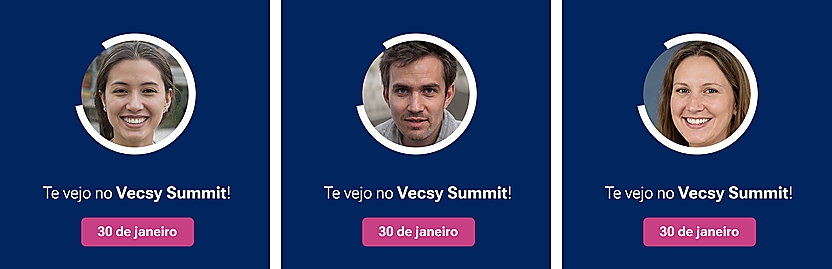
Three “I'm going” cards for a fictional event, Vecsy Summit, made with Vecsy from the same template. This is what the audience posts before the event: the artwork is the same for everyone, and the photo changes for each attendee.
The event profile talks to people who already follow the event. The card each attendee posts talks to each attendee's network. If you'd like to see how that looks with your event's artwork, see how a card made with Vecsy works.
What to post before the event?
Before the event, every post has to give people a new reason to register. Repeating “register now” with the same artwork won't do it.
- The announcement. Date, venue, who the event is for and the registration link. Pin this post to the top of the profile: it's what everyone opens first.
- One post per speaker. Their photo, name and talk topic, with a line about what people will take away. On the same day, send the speaker their card to post on their own profile.
- The agenda in parts. One post per track or per block of the day. Nobody reads the full schedule as a single image on a phone.
- Behind the scenes. Choosing the venue, the attendee kit, the team setting things up. It shows the event is real and made by people.
- Who's already going. Repost the first “I'm going” cards that tag the profile. It's the post the event profile can't make on its own: someone from outside saying they're going.
- The countdown. In the last few days, together with the logistics: time, address, check-in.
In this phase, the audience posts the “I'm going” card. Speakers post the “I'm speaking” card, and sponsors post the card with their company logo. What goes on each one is in how to make the event card for each group.
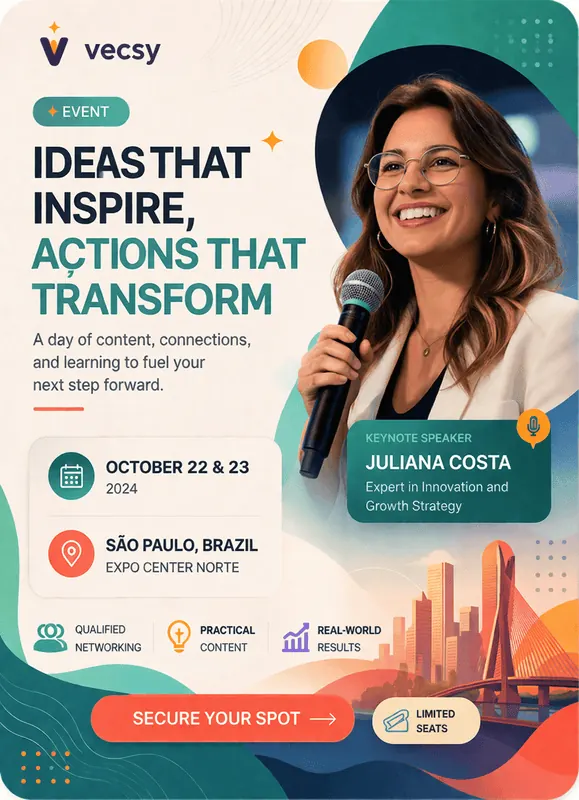
Speaker card for a fictional event made with Vecsy. The speaker posts hers on her own profile; the event profile posts the talk announcement.
What to post during the event?
During the event, posts show what's happening and who's there. People who didn't go see what they missed, and that's what brings them to the next edition.
- Stories of what's happening. The opening, check-in, the stage, the break. Short and in the moment: nobody cares about yesterday's event story.
- One idea per talk. The line that stuck from each talk, with a photo of the speaker on stage and a tag. They repost it, and the talk reaches their network.
- What the audience posted. Repost the people who tagged the event. Whoever sees the repost remembers they can post too.
- Announcements. The next session, a room change, lunch time. It's useful for people who are there and shows people who aren't that the event is full of things going on.
In this phase, the audience posts the “I'm here” card. Put the link in a QR code at check-in and on the screen during breaks, for people who arrived without posting beforehand.
What to post after the event?
After the event, posts keep it alive and start the next one. The week after is when people who went still feel like posting.
- The thank-you. The next day, with photos and the names of the people who made the event happen: speakers, sponsors, team.
- The highlights. One post per idea that stuck, or a carousel with the most talked-about talks.
- Recordings and materials. If there are any, say where they are. It's a reason for attendees to come back to the profile, and for everyone else to find it.
- The numbers you counted. How many people came, how many talks, how many cities. Only the ones you counted yourself: a number with no source undermines the rest of the post.
- The next edition. The date, if there is one, or the interest list. People who posted this time are the first to get the invitation.
In this phase, the audience posts the “I went” card or the certificate of attendance, with the name of each person who was there.
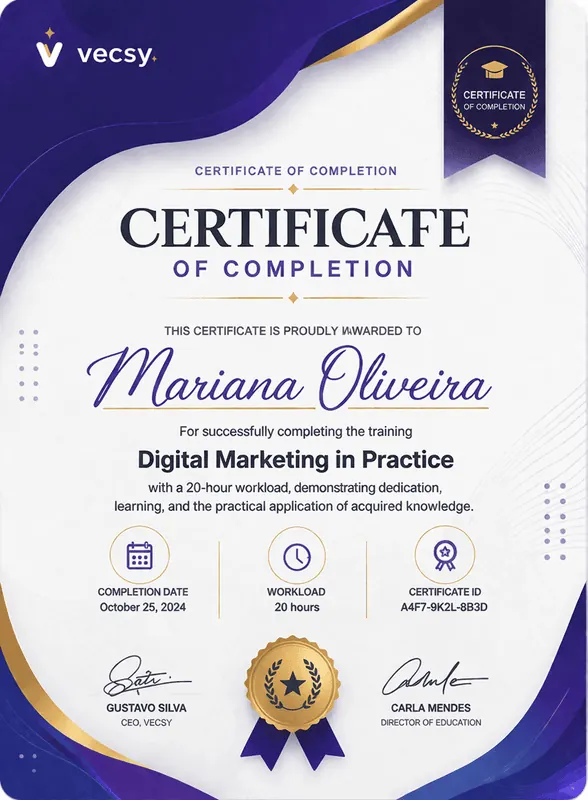
Certificate of completion for a fictional training course, made with Vecsy. The name changes for each participant; everyone who completed it downloads their own and posts it.
How to build your event's posting plan
Step 1: mark the dates that don't move
Registration opening, each speaker announcement, the last day to register, the event day and the week after. The plan hangs on these dates. How far ahead to start and who to bring in each week is in the event promotion calendar.
Step 2: write one post per date, for both profiles
For each date, note the event profile's post and what the audience posts alongside it, if anything. A three-column table is enough: date, event post, audience card.
Step 3: build the cards before registration opens
One card per group (“I'm going”, speaker, sponsor, “I'm here”, “I went”), all with the same look. On Vecsy, one page brings all of the event's cards together under a single link, and each person picks theirs. To start with the first card, the free trial gives you 1 active card and up to 100 downloads, with a “Created with Vecsy” watermark and no credit card. The step-by-step for the attendee card is in how to create and share the “I'm going” card.
Step 4: write all the captions at once
The event profile's captions and each card's caption, all with the hashtag and the registration link. People who download the card copy the ready-made caption; without it, the post goes out with no link and brings no one to the event.
Step 5: put someone in charge on the day
The person posting stories and reposting the audience on the day can't be the one at check-in or on stage. Make sure they have a charged phone, the list of profiles to tag and the day's captions ready.
What mistakes leave the event profile talking to itself?
- Posting only the invitation. Six “register now” posts with the same artwork teach followers to scroll past. Every post needs something new: a name, a topic, a behind-the-scenes moment.
- Leaving the audience out of the plan. If the plan only has the event profile's posts, the event only reaches people who already follow it. The card in each phase takes the event to the network of each person who goes.
- Going quiet on the day. The whole team is busy, and the profile stops right when the most people are watching. That's why step 5 exists.
- Stopping the day after. The after is the start of the next edition. If you skip the thank-you and the highlights, you miss the moment when the audience is still talking about the event.
When does Vecsy not fit this plan?
- The post is the same for everyone. If nobody needs to add a photo or a name, one design made once in Canva that everyone reposts does the job.
- The event is private. An internal meeting or an embargoed launch: a direct invitation works, and a public post gets in the way.
- The post is a video. Stories and short videos on the day come from the phone of whoever is there. Vecsy generates images (PNG, and PDF on the PRO plan), not video.
Read next